MYSTERYHIKE SUPPORT
How can we help?
How can we help?
Find quick answers to the most common MysteryHike questions.


GET HELP FASTER
Join our community on Discord!
Questions?
We’ve got answers
Get quick help from our team and the MysteryHike community.

Getting Started
Getting Started
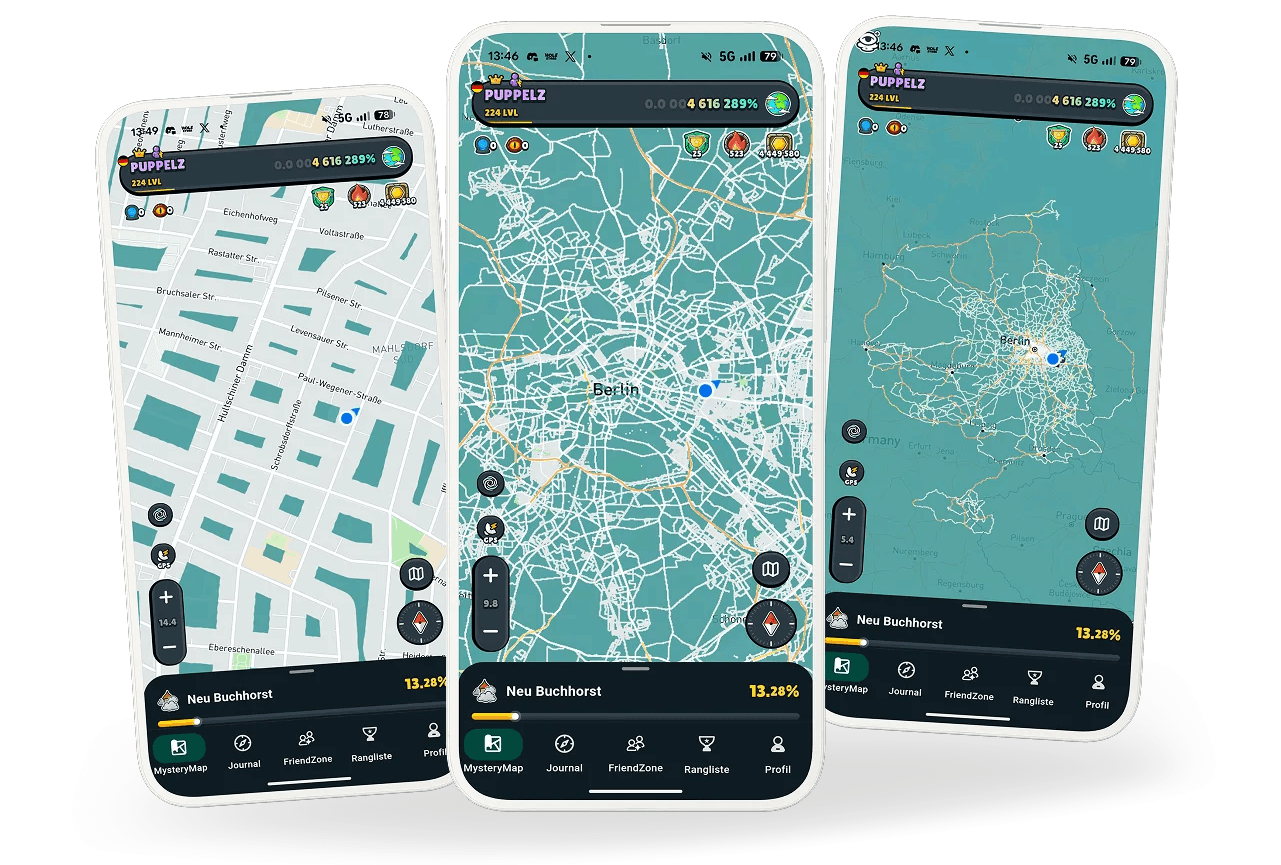
MysteryHike turns the real world into your personal map. As you move, you gradually reveal the fog, discover new places and build a lasting record of the areas you’ve actually explored.
You can download MysteryHike from the App Store for iPhone and Google Play for Android.
For anyone who loves discovering new places, travelling, going on trips, or simply wants more motivation to get outside and move.
Yes. You can use MysteryHike while walking, running, cycling, driving, and during other types of travel. The idea is to explore the world at your own pace and in your own way.
How MysteryHike Works
How MysteryHike Works
The map reveals automatically as you move in the real world. MysteryHike uses GPS to gradually uncover the area around your current location.
Yes. MysteryHike works worldwide anywhere your device can receive a GPS signal.
Yes. In FriendZone, you can add friends, compare your progress, and see what you’ve explored together.
To track your movement correctly, MysteryHike needs access to your location, including background location, and physical activity permission.
Mystery Places are interesting locations scattered across the map. Until you visit them, you won’t know what’s waiting there.
You make progress by revealing the map, discovering Mystery Places, completing locations, and taking part in other activities in the app.
GPS, Background & Offline
GPS, Background & Offline
No. MysteryHike can track your movement in the background, but Always Allow Location and Physical Activity permissions must be enabled.
ECO mode turns GPS off after about 5 minutes of inactivity to save battery. It activates again automatically when you start moving or pick up your phone, as long as Physical Activity permission is enabled. POWER mode keeps GPS running continuously for more accurate tracking, but uses significantly more battery and must be turned on and off manually when needed.
Yes. MysteryHike can work offline. Mystery Places and some other online features may not load without an internet connection, but your map-reveal progress is stored directly on your phone while offline. Until that progress has synced, do not uninstall the app, or you may lose the locally stored progress.
MysteryHike is a GPS-based app, so tracking accuracy depends on the quality of the GPS signal. In trains, tunnels, airplanes, and other places where the signal is weak or unavailable, your location may not be recorded correctly and part of the route may be missing.
Background tracking can only be enabled when MysteryHike has Always Allow Location and Physical Activity permissions. If either permission is missing, background tracking cannot be turned on.
Yes. You can turn off background tracking and use MysteryHike only while the app is open. This can help reduce battery usage.
Map, Progress & Battery
Map, Progress & Battery
You complete a location by gradually revealing its entire area on the map.
If you can’t physically reach a place, you can use a Portal to reveal that area on the map remotely.
The most common cause is missing Location, Background Location, or Physical Activity permissions. Also check that your phone’s system GPS / Location Services are enabled and that the device has a sufficient GPS signal.
Missing progress can have several causes, such as weak GPS signal, background system restrictions, or a synchronization issue. If part of your route or revealed map was not saved correctly, we recommend reporting it on Discord or contacting support.
You can lose progress only if you explored while offline and the data has not yet synced. Before reinstalling, we recommend opening the app with an internet connection and allowing your progress to sync. In many cases, reinstalling can also help resolve technical issues.
MysteryHike is a GPS-based app, so it uses more battery than regular apps. We continuously work on improving battery efficiency.
For everyday use, we recommend ECO mode, which automatically turns GPS off after a period of inactivity and activates it again when movement is detected. Use POWER mode only when you need continuous location tracking, as it uses significantly more battery.
Free, Premium & Purchases
Free, Premium & Purchases
Yes. You can use MysteryHike for free. In the Free version, you can reveal the map while moving at speeds up to 30 km/h. Premium is required to reveal the map at higher speeds.
In the Free version, the map does not reveal when you move faster than 30 km/h. Your movement is still recorded, and after activating Premium you can restore that progress for up to 45 days back.
Yes. If your movement was recorded while travelling above 30 km/h, Premium can restore that progress retroactively. The restore period depends on your plan: Monthly up to 7 days, Yearly up to 30 days, and Lifetime up to 45 days.
Premium removes the 30 km/h speed limit, allowing you to reveal the map at higher speeds. It also lets you restore progress recorded above 30 km/h, depending on your selected plan.
No. Purchases from the App Store and Google Play cannot be transferred between platforms. If you bought Premium on iOS, it cannot be used on Android, and vice versa.
Your purchase is not linked to your MysteryHike account. It is linked to the Apple ID or Google account used to make the purchase. If Premium cannot be restored, make sure the app was installed from the store while signed in with the same account that originally made the purchase. Otherwise, the store will not recognize it.
If Premium is not showing, use Restore Purchase in the app. Make sure you are signed in to the App Store or Google Play with the same account that was originally used to make the purchase. If restoring does not work, contact us on Discord or by email.
Support & Troubleshooting
First, make sure you are using the latest version of the app and that Location, Background Location, and Physical Activity permissions are enabled. If the issue continues, try restarting or reinstalling the app — reinstalling often resolves many technical issues. If you were using MysteryHike offline, let your progress sync over the internet first.
The fastest way to report a problem is through the Bug Reports section on our Discord. We check this section regularly. If you don’t use Discord, you can also contact us by email.
Include your device model, system version, a short description of the issue, and ideally a screenshot or video. If the problem relates to a specific route or location, also describe when and where it happened.
The fastest way to get help is through our Discord. You can also contact us by email at fire@mysteryhike.com
On our Discord, experienced MysteryHike users can help with questions about the app or common issues. For news, inspiration, and community content, you can also follow us on Instagram.
You need to be a member of our Discord and register through the beta testing form. All beta communication takes place on Discord, and we’ll email you whenever a new beta test starts.
Contact our team
Contact our team
For account, purchase or app support.
For account, purchase or app support.
fire(@)mysteryhike.com
fire(@)mysteryhike.com
BETA TESTING
BETA TESTING
Sign up for beta testing
Sign up for beta testing
Sign up for beta testing
Join our Discord, where all beta testing communication takes place, then register through the form below. Whenever a new beta test starts, we’ll send an invitation to your email.
Join our Discord, where all beta testing communication takes place, then register through the form below. Whenever a new beta test starts, we’ll send an invitation to your email.
JOIN BETA TESTING →